Getting your app built and your core user flows working is a big milestone. But passing basic end-to-end tests doesn’t tell you whether those users can actually do only what they’re supposed to. A user being unable to view someone else’s data doesn’t necessarily stop them from changing or deleting it. Those actions can travel through entirely separate access paths, with their own permission checks.
Not “who can log in,” or even “who can see what.” The real question has four parts: ‘what can each of your users actually do?’ That’s what access control decides: who’s allowed to take which action, and it’s rarely a single switch. Unsure if your database rules hold up? Book a review with a technical expert to audit your permissions and secure your product.
Can a logged-in user do things they’re not supposed to?
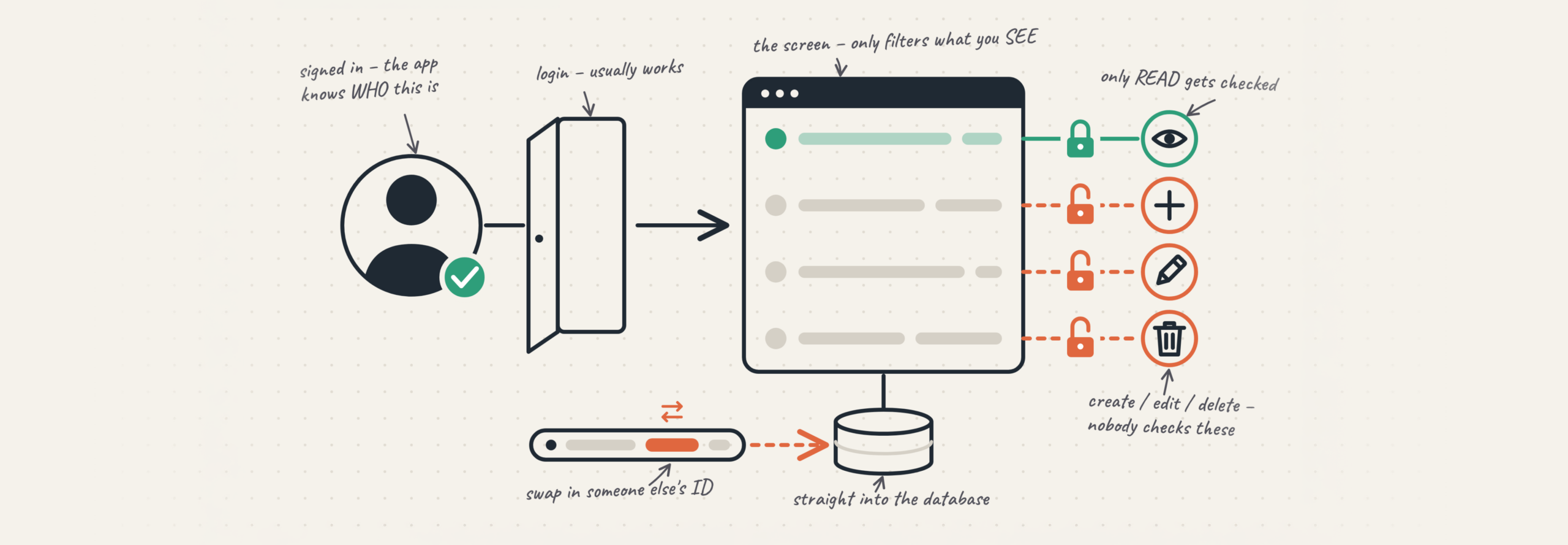
Yes, more often than most builders expect. Logging in answers one question: who is this person? It says nothing about what they may do once inside. Those are two separate jobs, and AI tools handle the first well. Sign-up, sign-in, password reset that flow usually works, because you can watch it work. If you’d rather map that second job with someone, a technical expert session covers it properly. What’s harder to watch is the second job: for every action, does this person have permission to take it? That check has to exist for each action on its own. When it is missing, the app still looks fine, whoever tests it only does what they’re allowed to do.
Isn’t hiding someone else’s data enough to protect it?
Hiding data protects it from being read. It does nothing to protect it from being changed or removed. Those are different permissions, granted in different places.
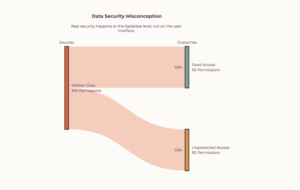
Hiding is a filter: each person sees only their own rows on screen. But editing and deleting don’t travel through the screen; they go straight to the database with the record’s ID attached. If nothing checks ownership on that path, the record was never locked. It was off-camera.
Why can one user edit or delete another user’s records?
Because the check that guards editing and deleting is a different check from the one that guards viewing, and it’s the one people skip.
Picture an internal tool a founder built for a client’s team. Every staff member logs in and sees only the requests they submitted; nobody else’s ever appears on screen. It looks locked down. Then one person opens the browser’s network tab, copies the address the app uses to update a request, and swaps in an ID that isn’t theirs. The app updates it. Nobody checked whether that user could change that record, the only rule anyone wrote was the one that decides what shows on screen.
Security researchers have a name for this: broken access control, and its close relative, insecure direct object reference (swapping an ID to reach data that isn’t yours). It sits at the top of the industry’s list of common web weaknesses. You don’t need the jargon only this: “they can’t see it” and “they can’t touch it” are two separate promises, and your app might keep only the first.
Where does my app actually decide who can do what?
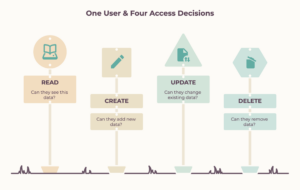
In the backend where your data lives. Most AI-built apps use a managed one, and two show up more than the rest: Supabase and Firebase. Both let you decide who can do what, and both make you decide it separately for each action.
In Supabase, those rules are called row-level security policies; they decide which signed-in user can touch which rows. You write them one action at a time: one policy for reading, separate ones for creating, changing, and deleting. Supabase’s own guidance says to write four separate policies, not one blanket rule. A table can end up with a reading policy and nothing covering the other three.
Firebase works the same way. Its security rules split into read and write, and write splits again into create, update, and delete, each its own line. One broad “allow write” opens all three at once.
How do I check what each user can do for every action?
Go through four actions for every kind of user, and test each one on its own. Sign in as an ordinary user and try to reach data that isn’t yours, one action at a time.
The four-action check for any AI-built app: run it once per user role:
| Action | Ask this about every role | What often goes unwired in an AI-built app |
|---|---|---|
| View | Can this person see only their own data? | Usually the one check that got built |
| Create | Can this person create records only as themselves, not for another account? | Ownership isn’t enforced, so records can be created for someone else |
| Change | Can this person edit only records they own? | The edit path skips the check the view path has; edits by ID go through |
| Delete | Can this person delete only records they own? | Least tested and permanent; the delete check is often missing |
The test is dull. Anything that goes through is a gap. Run it for every role: user, admin, client, teammate because each is its own set of four.
What to do if you’re not sure
If you can’t say, right now, what each of your users can do across those four actions, that’s worth a session with someone who has checked this before. A security review of your AI-built app covers exactly this, with an engineer who’s there to finish it with you.
Rubico is a software engineering firm that takes AI-built apps from working to production-ready.