You built the product. It works. People sign up, sign in, and land on their own dashboard with their own data on it. But here comes the question that testing does not answer: if one of your users went looking, on purpose, could they read everyone else’s data too?
Well, that’s not a major blocker, since you can find out that real quick. Read along to find a repeatable process with five steps and one pass condition. It checks whether your database is actually enforcing row-level security, making it a simple starting point for an application security assessment. You need a browser, a spare email address, and thirty minutes. That’s it. That’s all you need to fix issues related to your users’ data security.
Is signing in enough to keep user data separate?
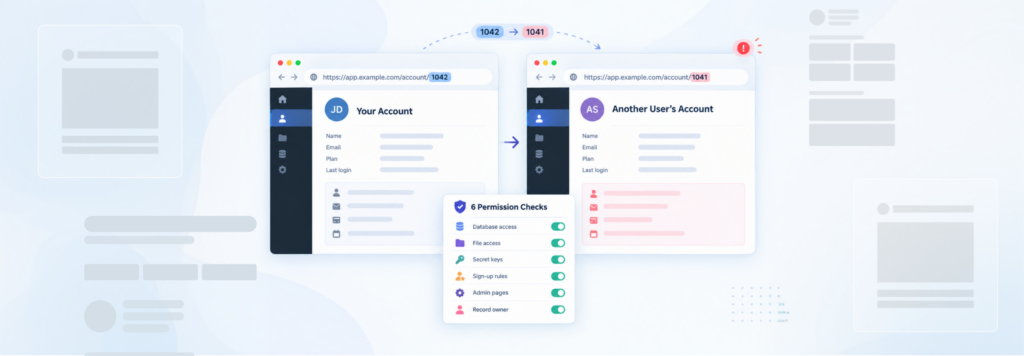
No. Signing in proves who somebody is. It does not decide what they are allowed to read. Those are two separate rules. Your database also needs to check that the data being requested belongs to the person asking for it. Without that check, a user can be signed in correctly and still end up seeing another user’s records.
Engineers call the second rule authorisation, and this specific gap has its own name. Broken object level authorisation, or BOLA, means the app checks that you are signed in but never checks that the record you asked for belongs to you.
Your product will not tell you what it is missing. Every screen looks right, because every screen asks for the current user’s data and receives it. Nothing in your interface ever asks for somebody else’s data, so nothing in your interface ever reveals that it would be handed over. That is why this reaches launch day intact. It is not a thing that breaks. It is a rule that was never written, and an app runs perfectly well without it.
Products built in Claude Code, Lovable, Bolt.new, v0, Base44, and Replit commonly keep their data in Supabase, and Supabase decides who can read which rows through row-level security, a set of per-table rules saying which signed-in user is allowed to see which rows. Whether those rules exist on your tables is a question about your project, not about the tool, and the query in the next section answers it in about ten seconds.
How do I check whether one user can read another user’s data?
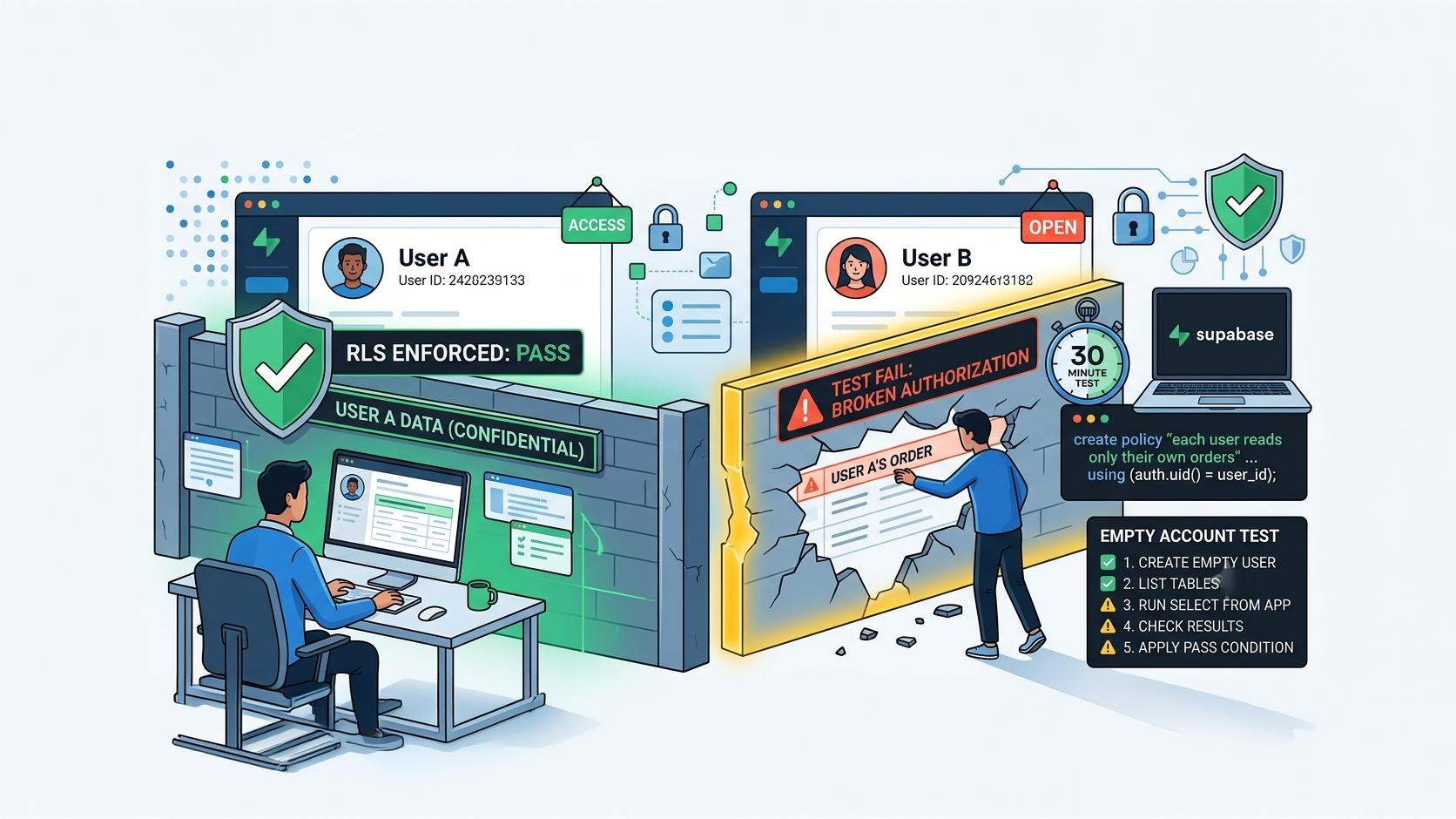
It’s simpler than it sounds. Create a new user account that doesn’t own any data, sign in, and check whether it can access records from each table in your database. If it can see even one record, you’ve found a problem: that data belongs to someone else. That’s the whole test: five steps, one clear pass/fail condition, and about 30 minutes to run.
This process is called the Empty Account Test. Run it the same way every time so the results are consistent and easy to compare.
Step 1: Create the emptiest account your app allows (5 minutes)
Sign up through your own front door with a spare email address. Then stop. Do not create a record, join a team, upload anything, or grant it a role. This account owns nothing, so anything it can see belongs to somebody else. That is what makes it the right instrument.
Step 2: Get the full list of your tables (5 minutes)
You are testing all of them, not the four you remember. Run this in your database’s SQL editor to list every table in the public schema alongside whether row-level security is switched on for it and how many rules it carries:
select c.relname            as table_name,
       c.relrowsecurity     as row_level_security_on,
       count(p.policyname) filter (where p.cmd in ('SELECT', 'ALL'))  as policy_count
from pg_class c
join pg_namespace n on n.oid = c.relnamespace
left join pg_policies p
       on p.schemaname = n.nspname and p.tablename = c.relname
where n.nspname = 'public'
  and c.relkind in ('r', 'p')
group by c.relname, c.relrowsecurity
order by c.relrowsecurity asc, policy_count asc;
Anything at the top of that result with false or a policy count of 0 is where you start. Keep the whole list; you are going to walk it.
Step 3: Sign in as the empty account and ask for everything (15 minutes)
Use a separate browser profile so you are not carrying your own session, and go through your live app rather than the database dashboard. This part matters. The SQL editor connects with an administrative role, so it sees everything by design and can’t tell you what a real user sees. Test through the same client your app uses.
In the browser console, signed in as the empty account:
// signed in as the empty account, in the running app
const tables = ['profiles', 'orders', 'messages', 'documents', 'organizations'];

for (const t of tables) {
  const { data, error } = await supabase.from(t).select('*').limit(5);
  if (error)             console.log(`${t}: BLOCKED (${error.message}) - pass`);
  else if (!data.length) console.log(`${t}: empty - pass`);
  else                   console.log(`${t}: RETURNED ${data.length} ROWS - FINDING`);
}
Paste in every table name from step 2.
If the console says supabase is not defined, your app has not put its client where you can reach it. Use this instead. Your project URL and public anon key are both on the API page of your project settings, and the third line reads the empty account’s own session out of the browser:
// signed in as the empty account, in the running app
const url  = 'https://YOUR-PROJECT.supabase.co';   // Project Settings → API
const key  = 'YOUR-PUBLIC-ANON-KEY';               // same page
const sess = JSON.parse(localStorage.getItem(
  Object.keys(localStorage).find(k => k.startsWith('sb-') && k.endsWith('auth-token'))
));

const tables = ['profiles', 'orders', 'messages', 'documents', 'organizations'];

for (const t of tables) {
  const r = await fetch(`${url}/rest/v1/${t}?select=*&limit=5`, {
    headers: { apikey: key, Authorisation: `Bearer ${sess.access_token}` }
  });
  const rows = await r.json();
  console.log(t, Array.isArray(rows) ? `RETURNED ${rows.length} ROWS` : `blocked: ${rows.message}`);
}
If neither one works, stop there and save what the console showed you. If you can’t complete this step, the app may be accessing the database somewhere you can’t check from the browser. That’s worth bringing up in a technical review.
Step 4: Write down what each table returned
Three outcomes only: nothing, an error, or rows. Record them table by table in the order you ran them. A screenshot of the console is enough. You want the record because it is the difference between a worry and a work item.
Step 5: Apply the pass condition
The pass condition: every table returns either an empty result or a permission error. The only rows the empty account can see are rows the empty account created, which is none. One row belonging to anybody else is a finding.
No partial credit and no interpretation. That is the point of writing the condition down before you start.
What the Empty Account Test does not cover
It checks reading. Three things sit outside it, and they are the next things to look at rather than reasons to distrust the result:
- Writing: A user who cannot read another user’s row may still be able to change or delete it. Reads and writes are separate rules on the same table.
- Files: Uploaded files and images live in storage buckets, which have their own rules and aren’t covered by the query in step 2.
- Anything the browser never touches: Server functions, scheduled jobs, and webhooks run under their own identity.
What counts as a pass, and what counts as a finding?
Nothing coming back is a pass. Rows coming back are a finding, and which kind of finding depends on whether the table had rules on it at all.
| What the empty account got back | What that means | What to do first |
|---|---|---|
| Nothing, on every table | Pass. Your rules are doing the job they exist to do | Re-run the Empty Account Test after your next few releases, and after any new table |
| A permission error on every table | Pass. The database is refusing the request rather than filtering it | Same. Keep the console screenshot with your launch notes |
Rows from a table with row_level_security_on = false or policy_count = 0 |
Any signed-in user can read that table in full. Highest priority | Switch the per-table rules on and write one policy per table before anything else |
| Rows from a table that already has a policy on it | The rule exists but does not tie the row to the person asking | Read the policy. Look for the shape in the next paragraph |
-- a policy that exists, reads fine at a glance, and separates nobody
create policy "enable read access for all users"
on public.orders
for select
using (true);
Here, using (true) means the condition every row is tested against is the word true, so every row passes. The policy is real; it is listed, and it filters nothing. The shape you want ties the row to whoever is asking:
create policy "each user reads only their own orders"
on public.orders
for select
to authenticated
using (auth.uid() = user_id);
auth.uid() is the signed-in user making the request. user_id is the column on the row saying who owns it. When those two have to match, one user reading another user’s row stops being possible at the database, which is the only place it stays true no matter what the interface does.
One more thing can invalidate the whole run. If the code shipped to the browser holds a key named SUPABASE_SERVICE_ROLE_KEY, or anything described as a service role key, then your frontend is talking to the database with an administrative identity and the per-user rules are not being applied to it. That key belongs on a server, never in code a user can open. Move it, then run the Empty Account Test again from step 1, because until then the test cannot tell you anything.
Why didn’t this show up sooner?
Because an app behaves completely normally without it. There is no error, no warning, and no slow page. The feature you asked the AI for was “let users see their orders”, and it built exactly that, correctly, for one user at a time. Nobody asked it what happens when the second user goes looking.
It is the gap we look for first, because it is the one that most reliably survives everything else. It works. Now it has to hold, and holding is a different property from working. Other checks on a launch list normally surface on their own eventually. This one often gets ignored, and that is what makes it expensive.
Something came back. What do I do before launch?
Then you know exactly what needs attention: which table is exposed, what the gap is, and what needs to be fixed, before customers find it for you. Instead of discovering the problem through a support email after launch, you have time to act on it now. That is what makes the test useful. A pass gives you confidence. A finding gives you something specific you can fix.
Where can I find help?
If you feel like things are going out of hand, or you don’t have an ample amount of time or energy to put into this, then Rubico is a software engineering firm that takes AI-built products from working to production-ready. If you want somebody to go through the issues that have come back to you, then book time with a technical expert.
Bring the console screenshot from step 4. Rubico’s technical team will review your screenshot and fix or walk you through how to fix your issues. We have done this on products like it before, including the Agrete platform, which was built in Lovable, where the questions were the same three: architecture, security, and whether it would hold once real users arrived.
Learn more about how Rubico can be your technical teammate.
My app passed the test, what should I check next?
Keep the process and keep the screenshot. The Empty Account Test takes thirty minutes, and it is worth running before every launch and after every new table. A new table added next month can arrive without the same access rules you already tested.
The next two checks, in this order:
- What can each user do? Reading is only one permission. A user may be prevented from seeing someone else’s data but still be able to create, change, or delete it. Check each action separately.
- What access rules are still using the defaults? Your app comes with permissions set up to make development easier. Before real customers use it, check that those defaults match what each type of user should actually be allowed to see and do.