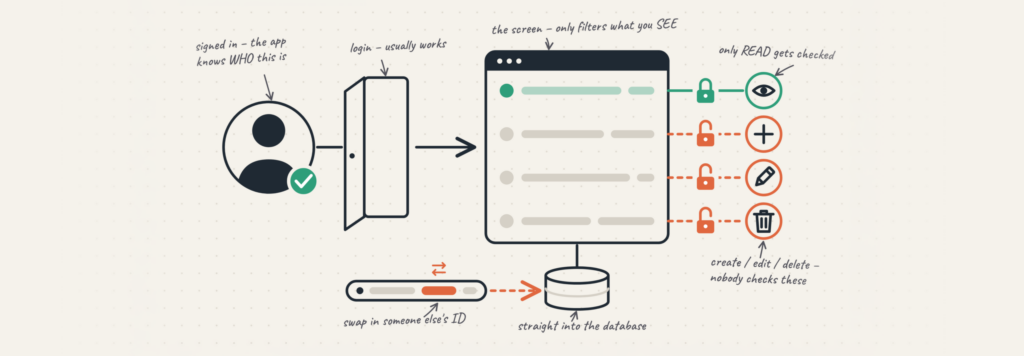
Rubico’s guide on “what access control is” was all about one simple distinction: “they can’t see it” and “they can’t touch it” are two separate things. Not just that, the check behind each one is something you have to write yourself, action by action! Which makes us have an obvious question: “If these checks matter so much, why do they get missed so often?”
Usually, this happens because nobody changed the settings the AI builder started building it with. AI tools make it easy to open things up and get an app working quickly. But when real customers show up, those settings don’t automatically change.
The app still works. That doesn’t mean it’s ready to be trusted.
What does “your access rules are still on the defaults” mean?
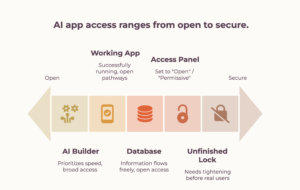
So, let’s find the rules on your app that are still sitting on their original settings, and the six checks you should close before real customers show up.
Access control is simply the set of rules that decides who can see what and who can do what inside your app.
When you’re building with AI tools, those rules usually start wide open because that’s the fastest way to test ideas and keep moving. “Still on the defaults” just means nobody went back and tightened those rules before the app reached real users. The result? The app allows far more than most customers would expect.
Our guide on access control explains the idea in detail. This post is more practical. It’s about finding the rules in your own app that are still set the way the builder left them.
Why do AI-built apps come with everything open?
Open settings make building faster. Tools like Lovable, Replit, Bolt.new, and Base44 keep things permissive so you can build and test without constantly hitting restrictions. Many of these apps use Supabase for data. Supabase’s row-level security (RLS) controls who can read which rows, for example, making sure a user can only see their own data.
Until you turn RLS on and add the right rules, a signed-in user may be able to access more than they should. That’s not the tool doing something wrong. It’s staying out of your way while you build. The problem starts when those defaults are still there after the app is ready.
How do I know if one customer can see another’s data?
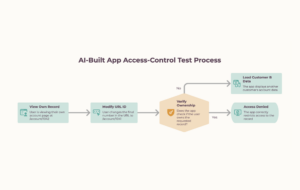
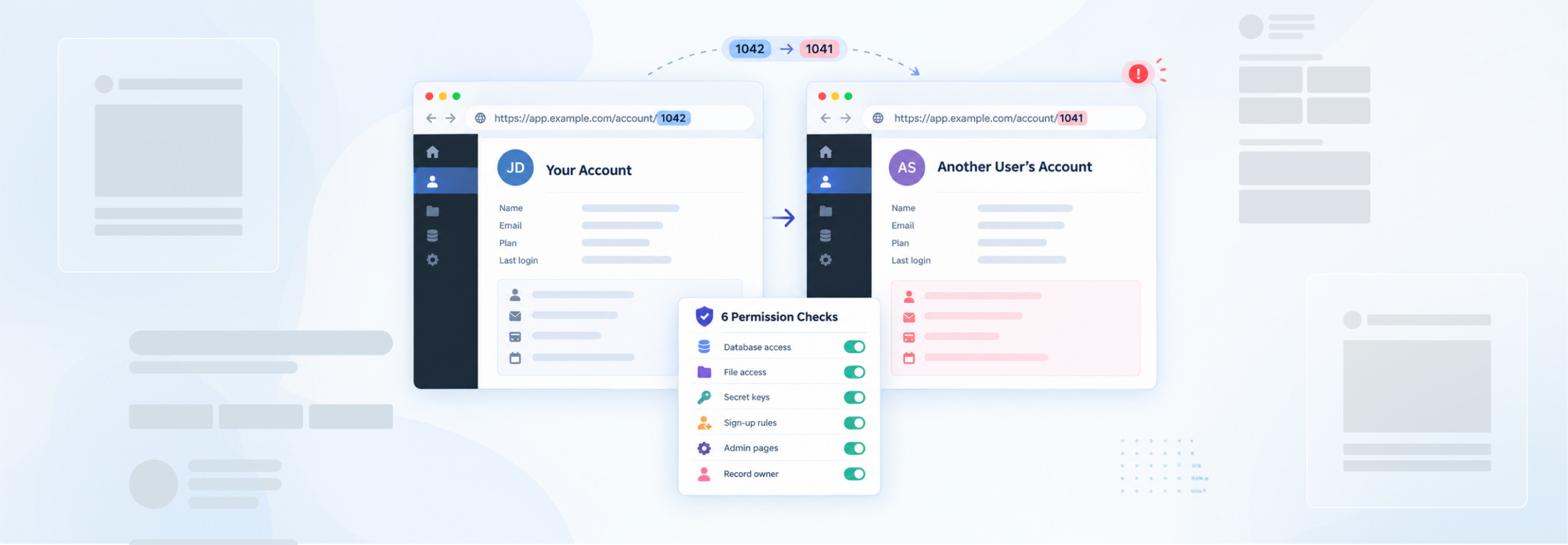
The quickest check is simple. Open a record that belongs to one user, then change the ID in the URL to another user’s. If their data loads, your app isn’t checking who owns the record. That means one signed-in user may be able to read another user’s data.
There’s a full walkthrough in the test for whether your app keeps user data private.
We see this even in apps built by capable people. Michael, an occupational therapist, built his platform in Lovable and launched it himself. Before he grew it, a review found compliance and security gaps around sensitive records that needed to be fixed first.
A missed access rule doesn’t mean the app is badly built. It means the defaults were never worked upon.
The 6 access defaults to check before real customers arrive
Here are six rules that are often left open in AI-built apps. You can check most of them in a few minutes, even if you’re not an engineer. And if you need help fixing one, the last column gives you the term to pass along.
| S.R.No. | The rule | What it’s set to by default | Why it matters | How to check |
|---|---|---|---|---|
| 1 | Who can read your database | Open: any signed-in user can read any row | One customer sees every customer’s data | Ask whether row-level security is on for every table, and whether any policy is set to USING (true) (a rule that allows everyone). The rule you want ties each row to its owner, like auth.uid() = user_id. |
| 2 | Who can open your files | Public: anyone with the link | Uploaded IDs, contracts and photos readable by strangers | Paste a file’s link into a browser where you’re logged out. If it opens, so can anyone. Then check whether your storage buckets are public. |
| 3 | Where your secret keys live | Sitting in the app’s front-end code | A secret key in the browser lets anyone act as your app | Search your project for a service_role key or any secret API key in front-end files. Secret keys belong on the server only. |
| 4 | What a brand-new sign-up can do | More than it should | A regular user can reach admin actions | Make a fresh account and try to open an admin page or edit someone else’s data. See how far a new user gets. |
| 5 | How your admin pages are guarded | Hidden, not locked | Typing the address reaches the admin panel | Log out, then type your /admin address straight into the bar. If it loads, the page was only hidden. |
| 6 | Who owns a record | Not checked | Changing an ID in the address opens someone else’s record | Open one of your own records, then change the ID to another user’s. If it loads, ownership isn’t being checked. |
If any one of them opens something it shouldn’t, that rule is still on the default.
What if some are still on the defaults?
First, this is normal, and finding it now is the whole point. Every item above is fixable, and none of it means the app was built badly. It works. Holding is a different job from working.
If you’ve run all these tests and are still facing access issues, then it is suggested to book a call with a technical expert who can look into your AI-built app’s issues and help you fix them without much hassle.