Building an app with Base44 can take less time than you think. You describe what you want, refine it, and share your data. Just like that, in just a few steps, you’ll get a working app.
However, getting an app to work initially and ensuring it scales as your user base grows are two different challenges. You might not notice a problem when testing the app yourself. But it could show up when multiple users log in or use the app at the same time. Or when your database grows. You might also need to check if users can access information they shouldn’t.
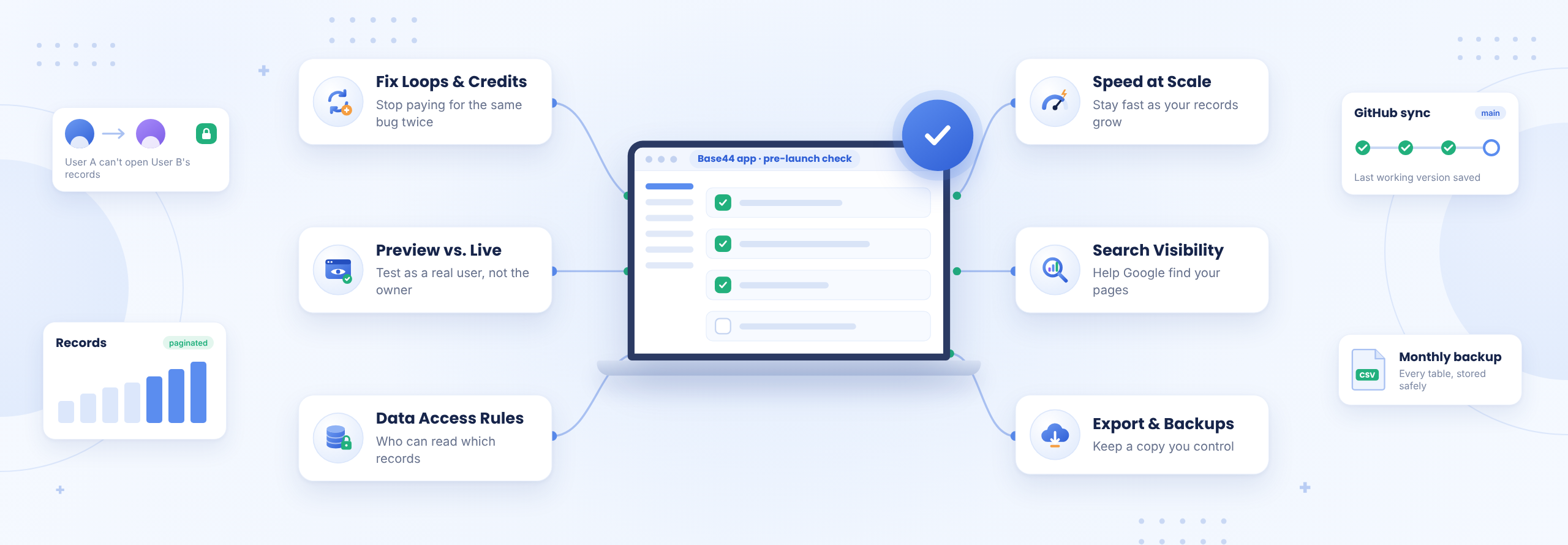
We looked at the issues Base44 builders often discuss on its feedback board and in builder communities. In this blog, we’ll cover six common problems, why they happen, and how to fix them. We’ll also share an 8-point checklist to help you prepare your app for launch.
Why does Base44 keep breaking features that already worked?
Base44’s AI agent can change more of your app than a prompt asks it to, so fixing one feature sometimes undoes another. Each repair round costs credits. Base44’s credits guide says there’s no set cost per message, broad requests that touch several pages use more, and on the Free plan even its “Resolve with AI” fixes use message credits.
How to break the cycle:
- Diagnose before you change anything. Base44’s Discuss mode plans without editing your app and typically costs about 0.3 credits per message, a fraction of a build prompt.
- Fence every prompt. Name the one thing to change and the things that must stay as they are. For example, the prompt should be something like this: “Update the invoice filter. Do not touch login, the dashboard or the Customer entity.”
- Save working versions. Turn on GitHub sync (Builder plan and up) and commit each time a feature works, so you always have a version to return to.
- Set a two-attempt rule. If you’ve asked Base44 to fix the same bug twice and it’s still there, a third prompt will usually try the same fix again and use up more credits. At that point, it is best to manually review the code or ask someone who can read code to look at what’s actually causing the bug.
Why does my Base44 app work in preview but not once it’s live?
An AI-built app that works in preview and stalls once it’s live usually differs in one of three places:
- user permissions and roles during testing
- API keys and environment settings
- or third-party service configurations
What to check:
- Test as a normal user. Base44’s User entity carries a role of admin or user. Create a plain user account and walk through every screen as that person.
- Point outside services at the live app. Stripe web-hooks, email senders and sign-in redirects should use your published URL, with live keys only in the live app.
- Give your custom domain time. A DNS record that hasn’t finished updating is a common reason a newly connected domain won’t load. Confirm it has propagated before changing the app.
Is my Base44 app safe to put in front of my users?
In Base44, row-level security decides which signed-in users can view, edit, or delete specific records. It’s a set of rules attached to each entity. If those rules are left open, one signed-in user can read every other user’s records without any warning in the app preview.
How to secure your application:
- Run Base44’s security scan. It checks for open access rules and secret keys exposed in your code. It can also fix some issues for you (Base44 docs).
- Know two quirks of Base44’s rules. A rule on a single field can’t block a delete, because a delete removes the whole record, so put delete restrictions on the entity itself (Base44 API reference). Also, rules that check whether a record belongs to the signed-in user only support exact matches (Base44 RLS examples).
- Keep secret keys out of your pages. OpenAI, Stripe and similar keys belong in backend functions, not in the code the browser loads.
- Try it like a curious user would. Sign in as user A, copy a record’s ID from the address bar, then sign in as user B and try to open it.
Why is my Base44 app slowing down as more people use it?
An AI-built app usually slows down because its pages load far more data than they display, and that cost grows with every record and every user. Base44 also limits how many requests each user can make per minute, and a single data request returns at most 5,000 records, according to its app performance guide. LowCode Agency, which builds Base44 apps, reports slowdowns once one collection reaches the tens of thousands of records.
What to do:
- Load long lists in pages. Ask Base44 to show 50 to 200 records at a time with filters, as its performance guide suggests, instead of fetching the full table.
- Move heavy work to the backend. Imports, reports and calculations belong in backend functions, not in the page.
- Watch your biggest entity. Check its record count once a month. When it climbs toward the tens of thousands, plan the next step before your users feel it.
Can Google find my Base44 app?
Yes, but it needs some setup from you. Base44 apps run in the browser, so Base44 serves search engines a prerendered copy of each page and refreshes it when you publish or your data changes, according to its SEO guide. Until a page has been prerendered, crawlers only get a short summary with its heading, description and links. Pages also don’t get their own meta description unless you add one.
What to do:
- Fill in your SEO settings. On Base44’s SEO & GEO page, set a title, meta description and share image for every public page you want to rank. Otherwise, search engines write their own snippets from whatever is on the page.
- Name pages that use URL parameters yourself. Base44 only creates an automatic title for pages without URL parameters, so give the rest clear titles by hand.
- Separate the app from the marketing collateral. If your business depends on a large blog or marketing site, it can still make sense to run it on a platform built for publishing and link it to your app.
Can I take my Base44 app with me if I need to leave?
You can take part of it with you. Exporting gives you the React frontend through a ZIP download or GitHub sync, on the Builder plan and above. That exported code still calls Base44’s servers for every database read and every login. Your records export as CSV, one table at a time, and there’s no documented way to export users’ passwords, so moving users means asking them to reset (Superblocks migration guide).
What to do today, whether or not you plan to leave:
- Export your data on a schedule. A monthly CSV of every table, stored outside Base44, is your backup.
- Connect GitHub now. Your code history then lives somewhere you control.
- Write down your data model. List every entity, its fields and its rules. That list is the map for any future move.
Should I stay on Base44, move one part, or move off entirely?
Most Base44 apps don’t need an all-or-nothing answer. The right move depends on four things: who uses the app, how fast your data grows, whether search traffic matters, and what your customers’ contracts require. Much of the migration advice online comes from platforms selling a new home, so start with the problem the move is meant to solve.
When to stay on Base44, move one part, or move off it
| What you’re seeing | Stay and strengthen | Move one part | Move off Base44 |
|---|---|---|---|
| Who uses it | Your own team | Customers, with one heavy feature | Customers, and revenue depends on uptime |
| Data growth | Comfortably within limits | One collection growing fast | You need direct database access and your own backups |
| Search traffic | Base44’s SEO settings cover it | A large blog or marketing site needs to rank | You need full control over how every page renders for search |
| Compliance | None required | None required | HIPAA, SOC 2 or a customer contract requires infrastructure you control |
The middle column is the one most people skip. Keep Base44 for what it handles well, such as admin screens, internal workflows and content management. Move the one piece that’s straining onto infrastructure you own, and connect the two through an API. You keep the speed you built with and lift the ceiling only where it hurts.
The 8-point Base44 pre-launch check
Run these eight checks on your Base44 app before your users arrive. Each one is something you can confirm yourself.
- Every entity has row-level security rules, and you’ve tested them while signed in as a normal user.
- Base44’s security scan reports no open entities and no hardcoded keys.
- Backend functions or secrets hold every secret key, and no key appears in page code.
- Stripe, email, sign-in redirects and your custom domain all point at the live app.
- Every long list loads one page at a time instead of fetching everything at once.
- GitHub sync runs, and you’ve committed the last working version.
- You keep a CSV export of every table somewhere outside Base44.
- You know which pages need to rank and where they fit within your website structure.
When it’s time for a second pair of eyes
You can close most of these checks yourself this week. A few take longer, like a fix loop the agent can’t get out of or a permission rule you’re not sure about, and those move faster with someone who has seen them before. You shouldn’t have to be the only person who understands how your product holds together.
Rubico is a software engineering firm that takes AI-built products from working to production-ready. If any of these checks leaves you stuck, Rubico’s technical experts can pick up where you left off and finish the work alongside you, and nobody there is going to grade what you built.
Frequently asked questions
Why does Base44 keep using credits to fix the same bug?
Base44’s agent can change more of the app than a prompt asks, so fixes sometimes undo earlier work. Diagnose in Discuss mode first, fence each prompt to one feature, commit working versions to GitHub, and stop after two failed attempts at the same bug.
Is my Base44 app secure enough to launch?
Check row-level security, the rules that decide which signed-in user can read which records. Run Base44’s built-in security scan, keep secret keys in backend functions, and test as a second user trying to open the first user’s records.
Can I export my Base44 app and host it myself?
You can export the React frontend on the Builder plan and above. The exported code still calls Base44 for data and logins. Records export as CSV, one table at a time, and Base44 doesn’t export users’ passwords.
Why is my Base44 app slow with more users?
Pages usually load more data than they show, and Base44 also applies rate limits and bulk-fetch caps. Load long lists in pages, move heavy work into backend functions, and watch the record count of your largest entity.