Claude has become a part of all of our lives who have an idea and want to make it a reality without really a technical background. We know exactly what we want, and Claude, with just a few questions, helps us build it without taking any help from a software engineer. The interesting part is that the app actually works! That’s weeks of real work!
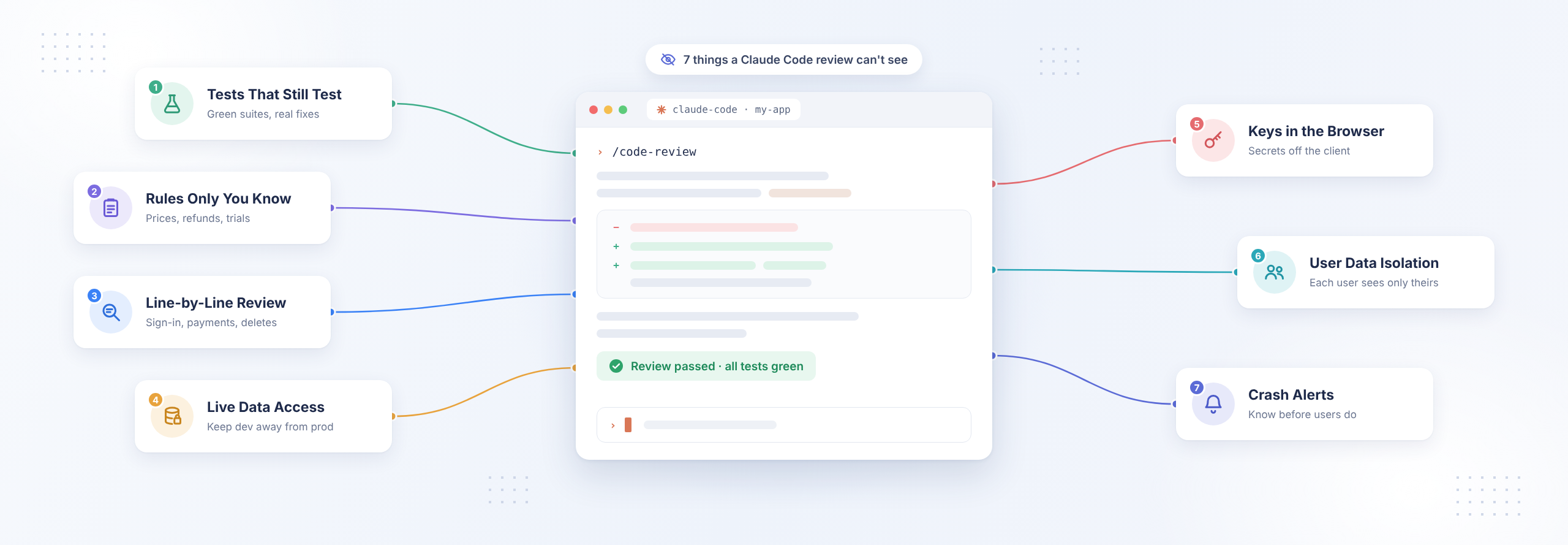
The tricky part is what happens later. Claude Code can review your code, and you can even ask Claude to check its own work. But neither one can tell you exactly what will happen when a hundred people log in at the same time, someone clicks a link they shouldn’t, or you accidentally leave a key somewhere it shouldn’t be. That’s why you need to check a few things yourself before you put your app in front of real users. Here are seven checks you can run this week with just a browser, your project folder, and Claude Code. You don’t need to become an engineer to do any of them.
What does Claude Code’s code review miss?
An AI code review reads your code and checks what it can see. It doesn’t know your business rules, and it never sees real traffic. It also can’t tell you if a passing test is still testing anything. Those three gaps are where AI-assisted app development leaves its loopholes, and each one needs a human to look at it. When Veracode tested more than 100 AI models in July 2025, 45% of the code samples introduced a flaw from the OWASP Top 10, which is the industry’s standard list of the most common web security risks.
None of this takes away from what you’ve built. Your app works, and that’s a big achievement. But a code review can only tell you so much, because your app might work perfectly in the preview and still run into problems when real people start using it. A user might see data they shouldn’t, two people might try to update the same information at once, or a feature might stop working when traffic increases. These aren’t things you would necessarily catch while building your app, which is why it’s worth checking a few things yourself before you put it in front of real users.
How do I check my Claude Code app before launch?
Go through these seven checks to catch problems before launch, from protecting user data to making sure your app works as expected. Note down anything you find so you know what needs fixing and can work through each issue before launch day.
1. Do your green tests still test anything?
Sometimes AI coding tools get a failing test to pass by gaming the test instead of fixing the actual code. Anthropic’s own research talks about coding models learning to exit a test run early so every test looks like it passed, and the EvilGenie benchmark caught the same kind of shortcut in Claude Code, Codex, and Gemini CLI. The suite turns green, but the bug stays.
To check this, open your project’s change history and see if any file in your tests folder changed in the same session as the feature it’s testing. You can also ask Claude Code straight out: “Did you edit any test files in this session, and why?” Then add this one line to your CLAUDE.md file, which is the instruction file Claude Code reads at the start of every session: Never change a test to make it pass. If a test looks off, stop and tell me.
2. Has anyone written down the rules only you know?
Claude can confirm a discount adds up. What it can’t know is that your finance team changed the discount rule last quarter. So a Claude Code app can be completely consistent and still charge the wrong price, because the rule it followed was never the one your business actually uses.
Write down the five rules your business can’t get wrong, things like who pays what, who gets a refund, which customers see which prices, and what happens when a trial ends. Put them in CLAUDE.md so every future session follows them. Then go through each one yourself in the live app with realistic data. If two screens show the same number, make sure it really is the same number.
3. Which parts of a Claude Code app need a line-by-line review?
Your review time counts most where a mistake can’t be undone. Go through the areas in the table below line by line, or get someone to go through them with you. Everything else can get a quick look.
Where to spend review time in a Claude Code app, by how much damage a missed mistake can do:
| Area of your app | What a missed mistake looks like | Review depth |
|---|---|---|
| Sign-in and password reset | A stranger signs in as one of your users | Line by line |
| Payments and subscriptions | A payment check that only runs in the browser gets skipped | Line by line |
| Anything that deletes data | Records disappear and can’t come back | Line by line |
| Who can see whose data | One signed-in user reads another user’s records | Line by line |
| Database changes (migrations) | A schema update wipes or empties tables | Line by line |
| Page layout, copy and colors | Something looks off, and you can see it right away | Quick look |
4. Can Claude Code reach your live customer data?
Claude Code works with whatever your project gives it. That includes the database passwords in your .env file, which is the settings file that holds your keys and passwords. If that file points at your live database, even a routine cleanup task can reach real customer records.
Four changes keep these two apart. Give your development work its own .env file that points to a copy of your data. Set up a read-only database user for any task that only needs to look around. Keep your backups somewhere other than the server they’re backing up. And before any command that touches your database or deletes files, switch Claude Code to plan mode, so it shows you its plan before it changes anything. Only say yes once you’re happy with it.
5. What can a stranger’s browser see?
Whatever your app sends to the browser, every visitor can read it. Open your live site, right-click, pick Inspect, and search the Sources and Network tabs for words like key, secret, and sk-. Also, any setting whose name starts with VITE_ or NEXT_PUBLIC_ is visible to every visitor on purpose. Both the Vite and Next.js docs say so clearly.
If your app uses Claude or another AI service, keep the API key on your server, not in the browser. Set a monthly spending limit with your AI provider. For Claude, you can find it in the Claude Console’s billing settings. Then add rate limiting to control how many requests a person can make per minute and prevent unexpected bills.
6. Can a second user see the first user’s data?
Make two accounts. Sign in as the first one, open one of your records and copy the address from the browser bar. Now sign in as the second one and paste it. If the second account can see the first account’s record, your app is checking who’s signed in on the screen, but not on the server.
Try changing the number at the end of the address to see if you can access someone else’s data. Security experts call this broken object-level authorization, and OWASP ranks it as the top API security risk. If your app uses Supabase, row-level security controls which data each user can access. Ask Claude Code to list every database table and the rules that protect it.
7. Will you know it broke before your users tell you?
An AI review can’t watch your app run. So nothing in Claude Code deployment will tell you when a page starts failing at 2 a.m. Before launch, add error tracking, a service like Sentry that emails you the moment something crashes.
Then use the app the way real people will. Get ten colleagues to sign in and use it at the same time. Open the pages with the longest lists and check that they load a page at a time instead of everything at once. Slow screens with ten people get slower with a thousand.
When should I get a second pair of eyes on my Claude Code app?
If you find something you can’t fix or aren’t sure Claude has fixed properly, it’s time to bring in an expert. This is especially important when your launch is near and your app handles payments or customer data. Rubico helps turn AI-built apps into products that are ready for real users. Our Claude Code consulting picks up where your own checks leave off, without judging how you built your app.
Book time with a technical expert to get your product audited by Rubico’s expert software engineers. Want to talk it over before you commit? Book a free 30-minute call with an Engagement Architect and leave with a clear picture of what your app needs next.
Frequently asked questions
Is a Claude Code code review enough before I launch?
It’s a good first pass. An AI review reads code well, but it can’t know your business rules, watch real traffic, or confirm that a passing test still tests anything. Use it alongside the seven checks above, plus a human review of sign-in, payments and data access.
What does it take to productionize a Claude Code app?
Four things, on top of features that work: each user seeing only their own data, keys kept out of the browser, backups stored away from your live server, and alerts when something fails. Most Claude Code software development gets the features right first. These four are what make it hol
d.
Can Claude Code change or delete my live data? Yes, if your setup lets it. Claude Code can run any command your setup allows, including commands against a database whose password is sitting in your .env file. Keep a separate development copy of your data, a read-only user for tasks that only look, and backups somewhere else.
Can Claude Code help me check if my hosting server is secure?
Claude Code can help you review your hosting setup and spot possible security gaps, but it can’t guarantee your server is secure. Ask it to check who can access your server, whether your database is exposed, if your software needs updates, and whether your backups are safe. Before launch, get an expert to review anything you don’t understand or aren’t sure how to fix.