You don’t need to know much about databases to get started with Bolt. You explain how you want the app to be built, and Bolt takes care of setting it up in that direction. Whether your app needs to store users, orders, or bookings, it creates a database accordingly. Thus, you barely need to put in any extra manual effort.
Sounds convenient, right? It is! But there’s a catch as well. Bolt may make some important decisions for your app before you even realise they’re being made.
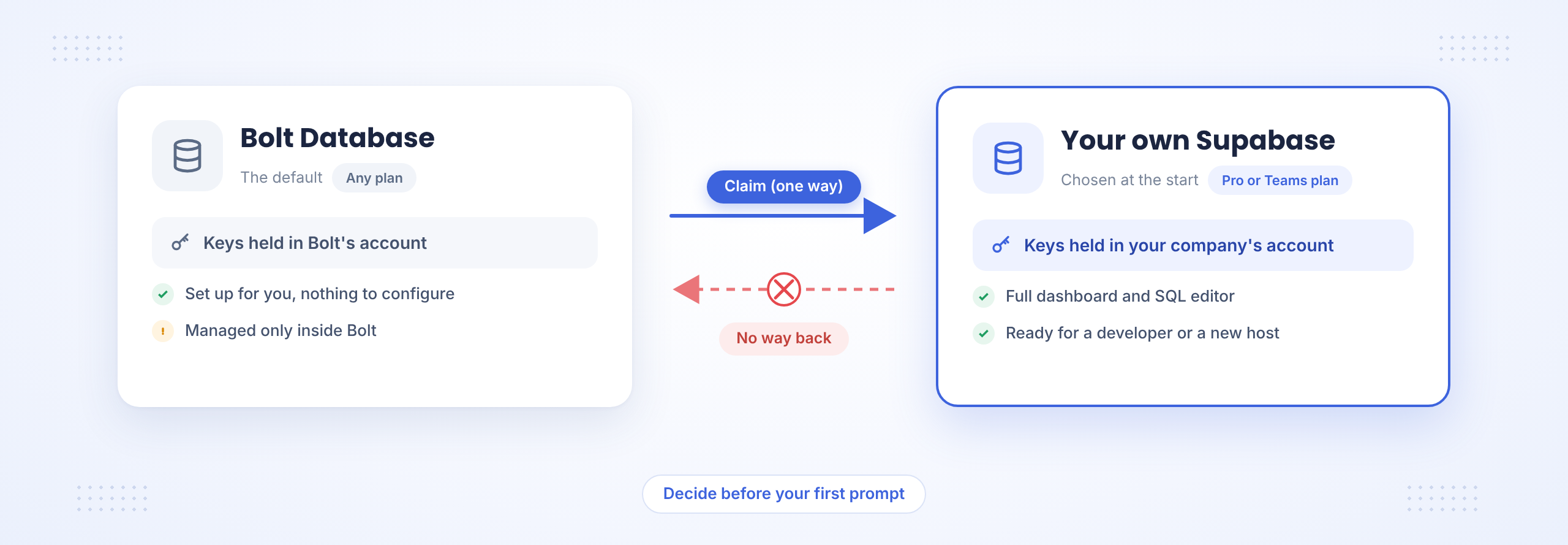
One of those decisions is where your app’s data will be stored. You need to choose between Bolt Database and your own Supabase project. It may not seem like a big deal while you’re building, but it can make a difference later when you want to move your app elsewhere, bring in a developer, or explain to a customer who has access to their data. And here’s the tricky part: some of these choices are difficult to change later, while one cannot be changed at all.Quick answer: Bolt Database is the default. It runs on Supabase, but the Supabase project sits in Bolt’s account, not yours, until you claim it. Your own Supabase project belongs to your organisation from day one and needs a Bolt Pro or Teams plan. Choose your own Supabase if a developer, a second host or a compliance review is in your future.
What is the difference between Bolt Database and your own Supabase?
Bolt Database is the database Bolt automatically sets up for your project. Your own Supabase is a separate database that you create and manage through your Supabase account, then connect to Bolt. Both use the same underlying technology, but the difference is who owns the database, who can access your data, and how easily you can move it elsewhere.
Here’s the catch, Bolt Cloud actually uses Supabase behind the scenes. But the database belongs to Bolt’s organisational account, not yours. That’s why you won’t see it in your personal Supabase dashboard unless you claim ownership of it. Supabase explains this here.
Table: Bolt Database compared with your own Supabase project, as of November 2026
| Bolt Database (default) | Your own Supabase project | |
|---|---|---|
| Who owns the Supabase project | Bolt’s organisation account, until you claim it | Your Supabase organisation |
| Bolt plan needed | Any plan | Pro or Teams |
| When to choose it | Bolt creates it automatically | When you create the Bolt project |
| Where you manage data | Bolt’s Database panel | Bolt, plus the full Supabase dashboard and SQL editor |
| Can you switch later? | Yes, one way only: claim it into Supabase | No supported way to move back to Bolt Database |
| Pausing when quiet | Can pause after six or more days of low use, unless it’s a live Bolt-hosted project | Free Supabase plans pause after a week of low activity, even if the app is published |
Sources for this table: Bolt’s database guide and Supabase integration guide.
Bolt’s own guidance is that, for most projects, staying on Bolt Database is simpler. To be honest, it does feel fair, too! It is the right default for many builders. The rest of this post is about the projects where it isn’t.
Which Bolt.new decisions are hard to undo later?
There are six decisions in a Bolt.new project that take only a few minutes to make at the beginning but can take a lot of time and effort to change later. Some can’t even be changed within Bolt once you’ve made them. So, it’s worth thinking them through before you start building or publish your app.
Checklist: six Bolt.new settings to decide before you build
| Decision | Decide it by | What happens if you change it later | |
|---|---|---|---|
| 1 | Bolt Database or your own Supabase | Project creation | Bolt to Supabase is possible by claiming. Supabase back to Bolt Database is not supported. |
| 2 | Which Supabase organisation Bolt connects to | Before connecting Supabase for the first time | Bolt connects to one organisation and you can’t change which one later. Disconnecting removes Supabase from all your projects. |
| 3 | Who is the owner of that organisation | Before connecting | Only a Supabase organisation owner can claim a Bolt Database. If that person has left, the claim stalls. |
| 4 | Bolt hosting or Netlify | Before your first publish | Once a project is published to Bolt hosting, you can’t move that same project to Netlify. You’d start from a fresh copy. |
| 5 | GitHub sync | Early, ideally day one | Only GitHub commits leave Bolt with you. Chat history stays in Bolt and is deleted with the project. |
| 6 | Where you keep a copy of each API key | Every time you add a secret | Bolt offers no way to read a stored secret back. If you leave, every key has to be re-issued at its provider. |
Decision 2 is the easiest one to get wrong without noticing. Most builders connect Supabase with whatever account they signed up with, which is usually a personal one. If the product belongs to a company, create a company-owned Supabase organisation first, add at least two owners, and then connect that one.
When is Bolt Database the right choice?
Bolt Database is the right choice when your app will stay on Bolt hosting, you’re on a plan without Supabase access, or you’re building something internal where nobody outside your team will ask where the data lives. It needs no setup, and databases in live Bolt-hosted projects aren’t paused for inactivity.
It also suits the stage where you’re still working out what the product is. You can change your mind later: claiming moves the database and its data into your own Supabase account. The door out exists. It only opens one way, and it needs a Pro or Teams plan when you open it.
When should you start with your own Supabase project?
Start with your own Supabase project if any of these will be true within the next year:
- A developer or agency will work on it. They’ll want the Supabase dashboard, the SQL editor and direct access to logs, not a panel inside someone else’s builder.
- You plan to host outside Bolt. Once your app lives on Netlify, Vercel or your own server, its database should live in an account you control too.
- Customers will ask who holds their data. Security questionnaires and compliance reviews ask who controls the database. “Our own Supabase organisation” is a better answer than “a project in our app builder’s account”.
- You need Supabase features Bolt doesn’t expose. Leaked password protection, for example, requires a Supabase Pro plan.
One trade-off to know before you switch. A free Supabase plan pauses the database after a week of low activity, and that applies even when your Bolt project is published. When that happens, Bolt shows the database as disconnected, and your app looks like it has stopped working. If someone searches “bolt.new app not working” on a quiet Monday morning, a paused database is one of the first things to check. Resume it in Supabase, or move to a paid Supabase plan before launch.
Does the database choice change how secure your Bolt.new app is?
Not on its own. Bolt Database and your own Supabase both run on Supabase, and both protect your users’ data with row-level security: the rules that decide which signed-in user can read and change which rows. Bolt’s documentation puts it plainly: a table without row-level security can be read and changed by anyone.
What the choice changes is who can check. Bolt has a Security Audit page that runs the same checks as Supabase’s Security Advisor and lists the most serious issues first. Two limits are worth knowing: it checks only your database, not your whole project, and you need to open it again after every database change, because a new table brings new rules to set.
With your own Supabase project, you, or anyone you bring in, can also run the check directly. This query lists every table in the public schema that has row-level security switched off:
select tablename
from pg_tables
where schemaname = 'public'
  and rowsecurity = false;
An empty result is what you want. Switching row-level security on is half the job. Each table also needs a policy that says who can see what, usually of the form auth.uid() = user_id, meaning “a user can only see rows that belong to them”. Bolt flags a policy that lets everyone through as ‘RLS Policy Always True’. That is only acceptable if you’re happy for any visitor to change or delete that data.
The database is one part of Bolt.new security. API keys in the browser, sign-in flows and payment webhooks sit outside the database and outside the Security Audit page. We go through those on our Bolt.new production checks page, and the wider picture of how AI-built apps handle user data is worth a read before launch.
Already built on Bolt Database? How do you move to your own Supabase?
You can move an existing Bolt Database into your own Supabase account with Bolt’s Claim feature. It requires a Bolt Pro or Teams plan, and you need to be an owner of the Supabase organisation connected to Bolt. The steps to do it are very simple. However, the checks after those steps are more important.
Follow these Bolt’s instructions:
- Connect Bolt to your Supabase account, using the organisation you want to own the data long-term.
- Open the Bolt project and click the Database icon at the top centre of the screen.
- Open the Advanced tab and click Claim.
- Finish the remaining steps in Supabase.
Don’t click Connect instead. On a project that already has a Bolt Database, connecting a different Supabase database replaces the connection, and Bolt warns this may cause data loss. Claim keeps your data. Connect starts over.
Then check five things (drawn from Superblocks’ November 2026 migration guide):
- Users. Open the Authentication tab in the claimed Supabase project and confirm your user list is there.
- User IDs. Keep them unchanged. Every table that stores a user_id relies on those IDs to know whose row is whose.
- Server functions. Compare the Edge Functions list against your code and redeploy anything missing.
- Secrets. Re-issue every API key at its provider and add it to the new setup, since Bolt can’t show you stored secrets.
- Files. Compare file counts in the Storage tab against what your app expects.
And one habit that saves a lot of grief: don’t delete a Bolt project until its database has been claimed and checked. The project is your way back to that database.
What to do if your Bolt.new app is already live?
If your app is already live and you’re unsure which choices you made, just check the Database panel. Seeing Bolt Database isn’t a problem, but it’s worth understanding how the six decisions above could affect your app as you add more users, move hosts, or bring in another developer. And if you’re unsure what needs attention, Rubico’s technical experts can help review your Bolt.new app and get it ready for real users, without judging how you built it.
Frequently asked questions
Is Bolt Database the same as Supabase?
Bolt Database runs on Supabase, but the Supabase project is owned by Bolt’s organisation account until you claim it. You manage it through Bolt’s Database panel rather than your own Supabase dashboard.
Can I move from my own Supabase back to Bolt Database?
No. Bolt supports moving a Bolt Database into Supabase by claiming it, but there is no supported way to move a Supabase database back into Bolt Database. Pick Supabase when you need it, not as an experiment.
Why does my Bolt.new app say the database is disconnected?
The database is often paused. Free Supabase plans pause after a week of low activity, even for published apps. Bolt Database can pause after six or more days of low use unless the project is live on Bolt hosting. Resume it and reconnect.
Do I need a paid Bolt plan to use my own Supabase?
Yes. Connecting your own Supabase project and claiming a Bolt Database both require a Bolt Pro or Teams plan. On other plans the options show as locked, and Bolt Database is what your project uses.
Is my Bolt.new app secure if I use Bolt Database?
The database choice doesn’t decide that. Row-level security does. Check Bolt’s Security Audit page after every database change, and make sure every table has row-level security on and a policy that limits each user to their own rows.