Millions of people see or face problems, but not everyone ends up feeling deeply about that problem. It all starts with an observation, which is followed by turning thoughts into an idea, and an idea into a will to turn that idea into a reality. When you thought of building a software for a problem, you must not be the only one faced it, but definitely one of a few, who planned to do something about it. Most probably, that’s when you researched tools that could help you achieve your aim.
Replit is a popular AI app builder to turn an idea that’s in the form of a fully functional app in a very short period of time, as compared to traditional ways of building an app. It doesn’t require any complex setups, just a browser, an internet connection, an idea, and your enthusiasm to do it!
Just in the blink of an eye, you actually got it ready! Now, your customers can sign in, the data saves, and the screens are working properly, too. Later, you face a bug, make some changes, and the agent reports the fix as done. You open the app, and the same problem is still there!
Something that worked an hour ago has stopped working too. When a Replit app keeps breaking like this, the cause is usually how the platform and its agent behave once a product grows. Especially when you rarely did anything wrong!
Below are the six problems Replit builders run into, a quick fix for each, and a clear rule for when to stop prompting and bring in someone who has finished apps like yours before.
Why does Replit Agent keep breaking things it already fixed?
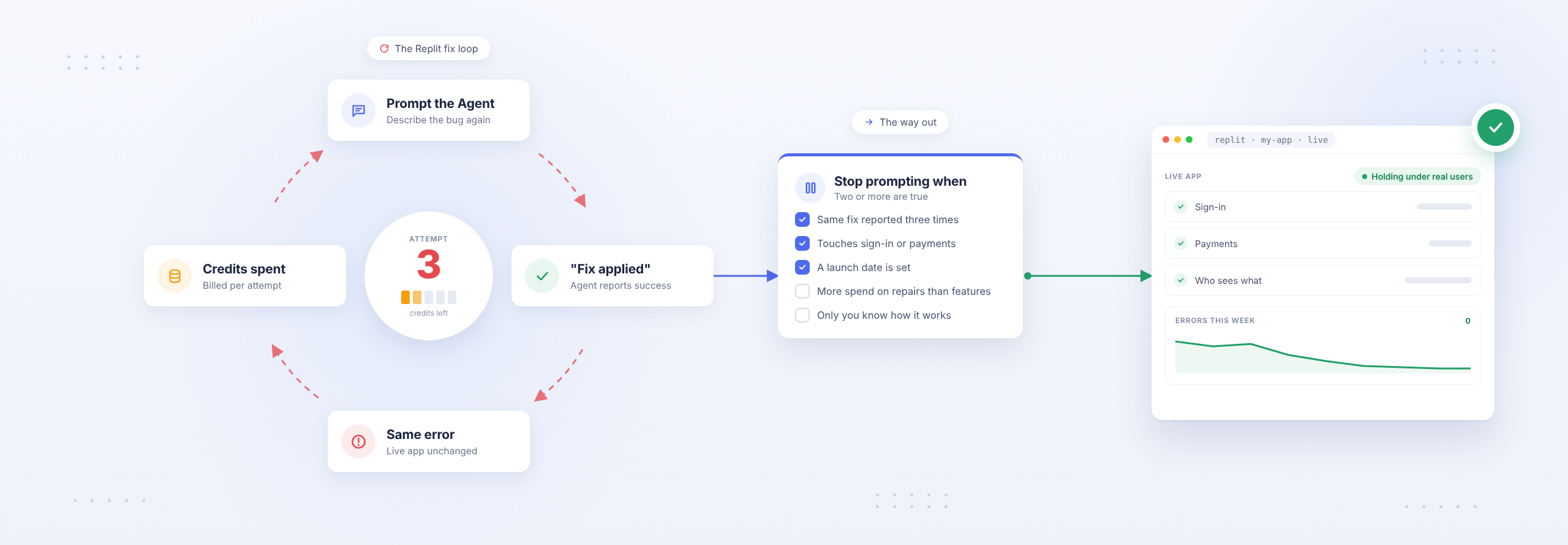
Replit Agent gets stuck in a fix loop when it keeps repeating the same steps and reporting the same success while the problem is never really solved. Each completed attempt is billed if you confirmed a paid action, and in Free Mode, it draws down your allowance. A loop that costs you credits as well as time.
Quick fixes:
- Press Stop in the chat panel the moment you see the same fix twice.
- If the Agent has frozen, stop sending messages, open the command palette (Cmd+K or Ctrl+K), choose Restart compute, and start a new chat that describes the task again.
- Roll back to a checkpoint. A checkpoint is a complete snapshot of your app. Rolling back removes every change made after it, so pick the last one where things worked.
- Make one change per request, and test it before asking for the next.
Why is my Replit bill so hard to predict?
Replit charges for Agent work by effort, so the price of a request depends on how complex it is. That variability is what makes bills hard to predict. Replit lets you set hard spending caps, alerts and budgets, but only if you set them up.
Quick fixes:
- Set a hard cap and spending alerts in your Replit billing settings before your next session.
- Give every bug a budget before you start. Decide how many attempts or how much spend it’s worth, and stop when you reach it.
- Check your usage after each working session, not at the end of the month.
How do I stop the Agent changing things I told it not to touch?
Instructions in a chat window are not always followed. AI coding agents can still change things you’ve told them not to. A safer approach is to limit what the Agent can access and keep a backup you can restore.
Quick fixes:
- Connect your app to GitHub so every version of your code lives somewhere you can control.
- Lean on the separation Replit already has. The Agent edits your development database and cannot modify production, so treat the live database as the thing worth protecting.
- Keep a “do not touch” list for sign-in, payments and user roles. Paste it into risky requests, and test those areas after every change anyway.
Why does my fix work in the editor but not in the live app?
Your published Replit app runs separately from the version you edit. A fix made in the editor reaches customers only after you publish again. Every Replit app also works with two databases, so the ‘test data’ that you change while building doesn’t change the ‘live data’.
Quick fixes:
- Republish after every fix that customers need to see.
- Move uploaded files out of the app’s own folders. The published file system resets every time you publish, so anything customers upload belongs in a database or a storage service.
- Read the logs before you prompt. A 502 error usually means the app process crashed, so check the deployment logs from right before it happened. A slow first load after a quiet spell is a cold start. That’s normal and nothing to fix.
Can the wrong people get into my Replit app?
Yes, if you haven’t set up the right security checks. Replit makes it easy to publish your app, but that doesn’t mean it’s secure. Your app may still have exposed API keys, pages anyone can access, or no protection against repeated requests.
Quick fixes:
- Store all API keys and passwords in Replit’s Secrets, not in your code or chat history.
- Run a two-account test. Sign in as one customer A and try to open customer B’s records. That attempt should fail.
- Open your sensitive pages while signed out. If they load, they need a login check.
What can I take with me if I leave Replit?
You can download your code as a ZIP file or move it to GitHub. However, some Replit features and settings won’t transfer with your code, and some changes you make on Replit cannot be reversed.
- Logins: Replit Auth signs your users in with Replit accounts, so it needs replacing with a sign-in system you own.
- Secrets: they never leave the old project. You set each one again on the new host.
- Data: you export your database and import it into a managed database elsewhere.
- Region: the region you choose when you first publish is permanent.
- Deleted databases: a removed production database can be restored for 7 days. After that, you can no longer recover it.
Should I keep my app on Replit or move it?
The honest answer depends on your business more than the platform.
Four signals for deciding whether a Replit app should stay on Replit or move off it:
| Signal | Staying on Replit makes sense | Plan a move |
|---|---|---|
| Who uses it | Your team, or a steady group of customers | Paying customers in growing numbers |
| Your bill | Agent and hosting costs you can forecast | Costs that swing month to month |
| Sign-in | Your users don’t mind Replit accounts | You need logins your business owns |
| Ownership | You’re comfortable on Replit’s hosting | An investor, buyer or client needs you to own the whole stack |
When should I stop prompting and bring in an engineer?
Stop prompting when you’re repeating the same fixes without making progress. If each new attempt creates more errors, wastes credits, or makes the problem harder to understand, it’s time to bring in an engineer.
These five signs tell you you’re there:
- The Agent has tried to fix the same issue three times, but it’s still not resolved.
- You’re spending more money fixing existing problems than building new features.
- The issue involves sign-in, payments, or user access.
- You have a fixed launch date to meet.
- You’re the only one who knows how the app works.
If two or more are true, another prompt is a gamble with your budget and your deadline.
Bring the problem the Agent is failing to resolve
Nobody is going to grade what you built. It works, and you got it there yourself. Now it has to hold under real users, and that last stretch is easier with someone who has seen it many times.
Rubico’s technical experts are here to help you move forward. Whether you’re stuck in a loop that won’t end, facing a bill you can’t explain, or unsure whether to stay or move, talk to our team. We’ll help you understand what’s going wrong and what to do next.
FAQ
- What do I do when Replit Agent is stuck in a loop? Press Stop in the chat panel. If it has frozen, open the command palette, choose Restart compute and start a new chat. Then roll back to the last checkpoint where the app worked.
- Why does my fix not show up in the live Replit app? The published app runs separately from the editor. Fixes reach customers only after you publish again, and live data sits in a separate production database.
- What can I take with me if I leave Replit? Your code, by zip or GitHub, and your data by database export. Replit Auth logins need replacing, and secrets must be set again on the new host.
- When should I hire someone instead of prompting? When the Agent reports the same fix three times, when the problem touches sign-in, payments or permissions, or when someone else’s deadline is close.