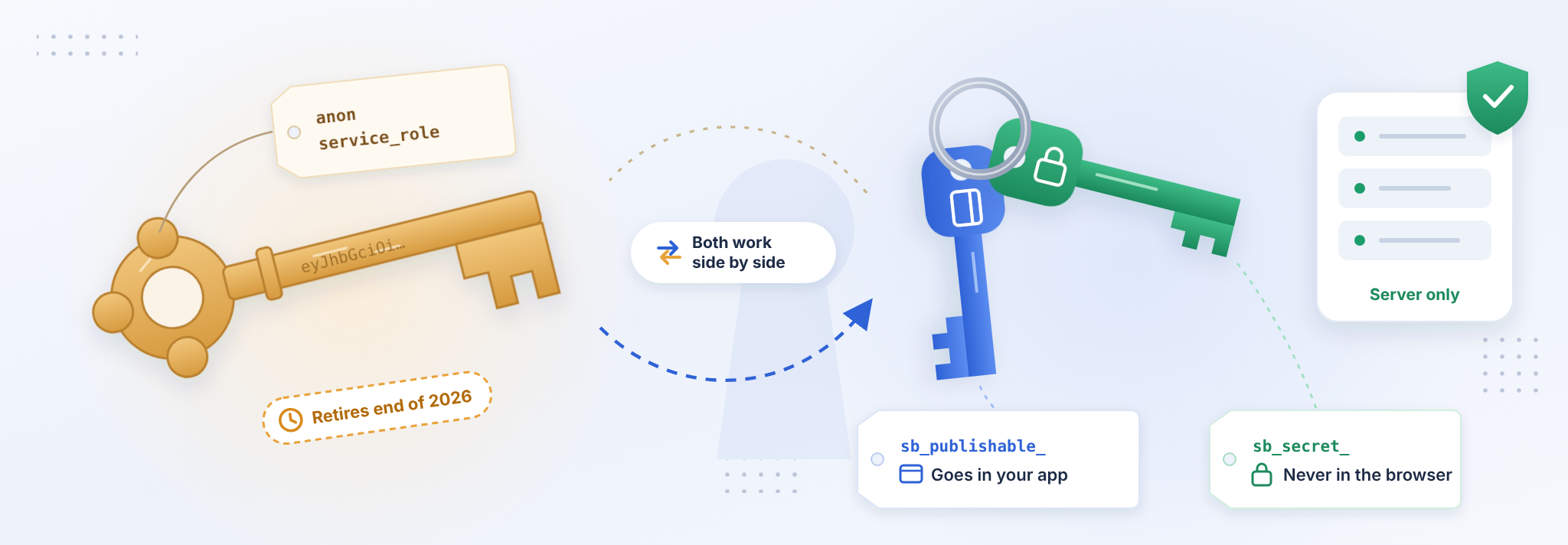
Supabase is retiring anon and service_role, the two keys your app most likely uses to talk to its database, by the end of 2026. The fix is to move to the new publishable and secret keys one part of your app at a time, while the old ones keep working. Do it in the right order, and your users won’t notice a thing.
Whether you have used Lovable, Bolt, Replit, or any other such AI tool, there’s a good chance your users’ data lives in Supabase. And you probably never had to think about these keys! The AI tool wired them in for you, the app worked, and you moved on to the parts your customers care about. That was the right call, and nothing about this change undoes the work you’ve put in.
Here’s the catch. Nothing has stopped working yet, but the end of 2026 is now weeks away, and Supabase’s own API keys guide gives no exact switch-off day. An app that still depends on the old keys when that day comes loses its connection to its own database.
Making the switch on your own schedule is a handful of small changes you can undo. Finding out on Supabase’s schedule is an outage, usually at the worst possible moment. In this blog, we’ll cover what’s changing, how to check which Supabase API keys your app uses in about ten minutes, the seven-step order that keeps your app running throughout, and the two places AI-built apps most often get caught out.
What is Supabase changing about its API keys, and when?
Supabase is replacing its two original API keys, anon and service_role, with a new pair: a publishable key and a secret key. Its documentation says it is deprecating the old pair by the end of 2026. Supabase hasn’t yet published a more exact date for existing projects.
Table: Supabase’s old and new API keys, and where each one belongs
| Old key | What it looks like | New key | What it looks like | Where it belongs |
|---|---|---|---|---|
| anon | A long string starting with eyJ | Publishable key | Starts with sb_publishable_ | In your app: browser, mobile, desktop |
| service_role | A long string starting with eyJ | Secret key | Starts with sb_secret_ | Only on servers and in Edge Functions |
The old and new keys work side by side. According to Supabase’s migration guide, creating the new keys doesn’t switch off the old ones, so you can move one part of your app at a time and retire the old keys only once nothing uses them.
What to check first:
- Whether your project already has the new keys. Open your Supabase dashboard and go to Settings, then API Keys. If you see a Create new API keys button, your project is still running on the old keys only.
- Whether you’ve ever paused and restored the project. Supabase says projects restored after 1 November 2025 no longer come with the old keys. If yours was paused and brought back, anything still using anon or service_role may already be failing.
How do I check which Supabase keys my app uses?
Open your live app, inspect any request it sends to supabase.co, and read the apikey header. A value starting with eyJ is an old key. A value starting with sb_publishable_ is the new one. Then search your code for the old key names to find every place that needs to change.
From the browser (about five minutes):
- Open your live app, right-click anywhere and choose Inspect, then go to the Network tab.
- Use the app for a moment: sign in, open a page that loads data.
- Click any request going to supabase.co and find apikey in the request headers.
From your code (about five minutes): if your project is connected to GitHub, search it for these terms:
- SUPABASE_ANON_KEY, or anon near your Supabase setup
- SERVICE_ROLE or service_role
- eyJ, which is how every old key begins
You can also ask your AI tool to list every file that reads a Supabase key and which key each one reads. Write down every match. That list is your plan for the switch.
Where does the publishable key go, and where does the secret key go?
The publishable key replaces anon and is meant to be public: it goes in your web, mobile or desktop app, where anyone can see it. The secret key replaces service_role and skips your database’s access rules entirely, so it belongs only on a server you control or in a Supabase Edge Function.
What keeps your data safe when the publishable key is visible is row-level security (RLS): the per-table rules that decide which signed-in user can read which rows. A visible publishable key with those rules in place is fine. A visible key with no rules behind it lets anyone who copies it read whatever your tables hold.
The secret key works the other way round. Supabase now returns an error when a secret key is used from a browser, by checking the browser’s identity on the request. Treat that as a backstop, not a lock. Someone who copies a leaked key can call your project from a script on their own server, where that check doesn’t apply.
In a typical Next.js app built with an AI tool, the switch looks like this:
# Before (.env)
NEXT_PUBLIC_SUPABASE_ANON_KEY=eyJhbGciOi...        # old key, in the browser
SUPABASE_SERVICE_ROLE_KEY=eyJhbGciOi...            # old key, server only

# After (.env)
NEXT_PUBLIC_SUPABASE_PUBLISHABLE_KEY=sb_publishable_...   # new key, in the browser
SUPABASE_SECRET_KEY=sb_secret_...                         # new key, server only
Anything starting with NEXT_PUBLIC_ or VITE_ is sent to every visitor’s browser on purpose. Never give the secret key one of those prefixes, even to get a stuck build through.
How do I switch Supabase keys without taking my app offline?
Switch one piece at a time while the old keys still work, and deactivate them only after you’ve confirmed nothing depends on them. Supabase’s migration guide follows the order below, and every step before the last leaves the old keys running, so your users notice nothing.
- Create the new keys. In your Supabase dashboard, go to Settings, then API Keys, and create a publishable key and a secret key. Your old keys keep working.
- Put the publishable key in your app. That covers the web app and any mobile or desktop version.
- Put the secret key on your servers. Anywhere that used service_role now uses the secret key, kept in your host’s environment settings and out of your code repository.
- Update database webhooks and scheduled jobs. Calls Supabase makes from inside your database, including Database Webhooks, usually send the old key in an Authorization header, and the new secret key is rejected there. Send it in the apikey header instead, and store it in Supabase Vault, the database’s built-in secret store, rather than typing it into the SQL.
- Update Edge Functions. Functions read the new keys from SUPABASE_PUBLISHABLE_KEYS and SUPABASE_SECRET_KEYS, each a list keyed by name, with the first key named default. Send the new keys in the apikey header only; sending them as Authorization: Bearer can trigger an Invalid JWT error.
- Check that nothing still uses the old keys. Supabase has no automatic usage report, so this is a check by hand. Go through app versions already installed on people’s phones, build and deploy pipelines, third-party integrations, scheduled jobs and background workers.
- Deactivate the old keys. If something you missed stops working, you can switch the old keys back on, which makes this step reversible.
For Edge Functions, the change in code is small:
// before
const secretKey = Deno.env.get('SUPABASE_SERVICE_ROLE_KEY')!
// after
const secretKey = JSON.parse(Deno.env.get('SUPABASE_SECRET_KEYS')!)['default']
There’s one more part of step 5 that AI tools often miss. Supabase’s built-in verify_jwt setting checks that a request carries a valid token, and it accepts the new keys during the migration. Passing it doesn’t tell your function who is calling. Supabase’s advice for functions that receive the new keys is to set verify_jwt = false and check the caller in your own code. Turn the setting off without adding that check, and the function will answer anyone who finds its address.
Why step 6 is the one most likely to surprise you. A mobile app already installed on someone’s phone can’t be updated from your side. If that version carries the old key, deactivating the key stops the app working for those users until they install your update. Release the update first, and give people time to install it before step 7.
What if my old service_role key was ever in browser code?
Treat it as leaked, and use this switch to retire it for good. AI tools sometimes move the service_role key into front-end code to make a permissions error go away. The app keeps working, which is why nobody notices.
What to check:
- Search what you’ve shipped. In your browser’s DevTools, open the Sources tab on your live app, or search your repository, for service_role, sb_secret_ and SECRET.
- Retire a leaked key by switching, not rotating. Supabase says the old keys can no longer be rotated. Move to a secret key, then deactivate the old pair.
- Confirm row-level security is on for every table. Tables an AI tool created through SQL or migrations don’t have it unless someone turned it on. This 30-minute Supabase row-level security test shows exactly what a signed-in user can read, and these six permission checks cover the settings to look at. For the full set of database, role, key and payment checks, use our security checklist for apps built in Lovable, which applies to any app with a Supabase backend.
The 7-step Supabase key switch checklist
Run these in order. Every step except the last leaves your old keys working, so you can stop at any point without affecting your users.
Checklist: seven steps from Supabase’s old API keys to the new ones
| # | Step | How to confirm it’s done |
|---|---|---|
| 1 | Publishable and secret keys created | Both appear under Settings > API Keys in your dashboard |
| 2 | App uses the publishable key | The apikey header on live requests starts with sb_publishable_ |
| 3 | Servers use the secret key | No service_role value remains in server settings, and no secret sits in your repository |
| 4 | Webhooks and scheduled jobs updated | The secret key is sent in the apikey header and read from Vault |
| 5 | Edge Functions updated | Functions read the new key variables, and any with verify_jwt = false check the caller in code |
| 6 | Nothing else uses the old keys | Your list from the ten-minute check is fully crossed off, including installed mobile versions |
| 7 | Old keys deactivated | Your app, webhooks and functions still work a day later |
When should I get a second pair of eyes on the switch?
If the switch involves payments, Edge Functions, or a mobile app already in users’ hands, bring in someone who’s done it before. A missed step can disrupt your app or leave a function exposed. Rubico’s software engineering team can help plan the switch, spot potential issues, and take your AI-built app from working to production-ready. Get started with a technical expert and bring the list from your ten-minute check. No judgment, just the right help to move forward.
Frequently asked questions
When do Supabase’s old anon and service_role keys stop working?
Supabase says it is deprecating the anon and service_role keys by the end of 2026. It hasn’t yet published an exact date for existing projects, so check Supabase’s announcements for your project and switch well before the cutoff.
Will switching Supabase keys take my app offline?
Not if you switch in order. The old and new keys work side by side, so you can update your app, servers, webhooks and Edge Functions first, then deactivate the old keys once nothing depends on them.
Is it safe that my Supabase publishable key is visible in the browser?
Yes. The publishable key is designed to be public. Your data is protected by row-level security, the per-table rules that decide which signed-in user can read which rows. Make sure it’s switched on for every table and that each rule ties rows to the signed-in user.
What happens to my mobile app when I deactivate the old Supabase keys?
Versions already installed on people’s phones keep using whatever key they shipped with. If that’s the old key, those versions stop working until users update, so release the update first and give people time to install it.
Can I turn the old Supabase keys back on after deactivating them?
Yes. Supabase lets you reactivate the old anon and service_role keys if you find something you missed, which makes deactivation a reversible step.